TL;DR
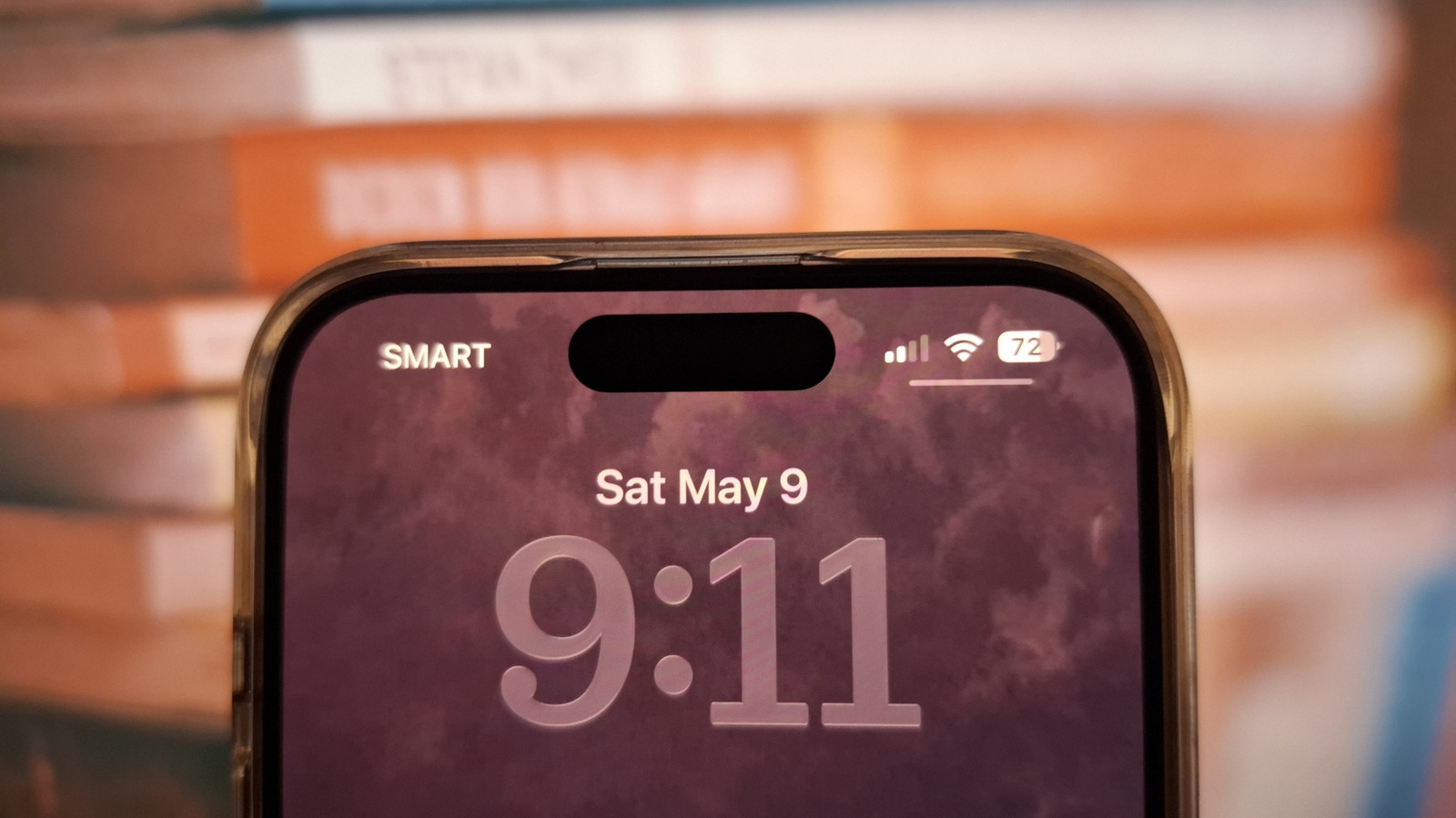
The thin line under the battery icon on your iPhone lock screen is the Control Center indicator, a feature introduced in iOS 18. Disabling it prevents thieves from accessing Control Center on a locked device, blocking a common method used to enable Airplane Mode and disable Find My iPhone during theft.
What Happened
On Sunday, May 17, 2026, BGR published an explainer revealing that the subtle line beneath the battery icon on iPhone lock screens is the Control Center indicator — a feature that, when disabled, creates a critical security barrier against iPhone theft. The indicator, which appears as a thin horizontal line below the battery percentage, signals that Control Center can be pulled down from the lock screen without unlocking the device.
Key Facts
- The Control Center indicator was introduced with iOS 18 in September 2024 as part of a major Control Center redesign.
- The line appears only on the lock screen when Control Center access is enabled; it disappears when access is restricted.
- Thieves commonly use Control Center from the lock screen to toggle Airplane Mode, which disables cellular connectivity and prevents Find My iPhone from transmitting location data.
- Disabling lock screen Control Center access requires navigating to Settings > Face ID & Passcode > Allow Access When Locked and toggling off Control Center.
- According to BGR, this simple setting change can render "stolen iPhones nearly worthless" because they remain trackable and lockable via Activation Lock.
- The feature is distinct from the Dynamic Island (introduced on iPhone 14 Pro) and the home bar (the horizontal line at the bottom of the screen).
- Apple has not officially commented on the security implications of this indicator, but the company has been actively expanding theft protection features since iOS 17.3 introduced Stolen Device Protection in January 2024.
Breaking It Down
The Control Center indicator is a textbook example of Apple's design philosophy prioritizing subtlety over clarity. The thin line is so unobtrusive that many iPhone users — including security-conscious early adopters — have never noticed it, let alone understood its purpose. This creates a dangerous gap between Apple's security intentions and real-world user behavior.
"A thief who can access Control Center on a locked iPhone can enable Airplane Mode in under three seconds, cutting off all remote tracking and wiping capabilities."
That three-second window is the entire difference between recovering a stolen device and losing it permanently. Once Airplane Mode is active, Find My iPhone cannot receive commands, Activation Lock cannot be triggered remotely, and the thief can power down the device without triggering any alerts. The phone becomes effectively invisible to its owner. By disabling lock screen Control Center access, users close this window entirely — a thief would need to know the passcode before they could disable connectivity, which dramatically increases the chance of recovery.
The security implication extends beyond Airplane Mode. From the lock screen, Control Center also provides access to Wi-Fi, Bluetooth, and Cellular Data toggles, plus shortcuts and smart home controls. A sophisticated thief could disable specific radios while leaving others active, or use the Shazam integration to identify audio playing on the device — all without unlocking the phone. The indicator line is effectively a visual tell that these attack vectors remain open.
Apple's decision to add this indicator in iOS 18 — rather than simply removing lock screen Control Center access by default — reflects a longstanding tension in the company's product strategy. Apple wants iPhones to be both highly secure and immediately convenient. The indicator was likely intended as a compromise: a visual cue for users who want to understand their device's security posture without sacrificing one-tap access to Control Center. But the line is so small and unexplained that it fails as both a security warning and a usability feature.
What Comes Next
- iOS 19 (expected September 2026) — Apple is widely expected to introduce a lockdown mode for lock screen controls, potentially making Control Center access require Face ID or a double-click sequence by default. Industry analysts predict this will be a headline security feature at WWDC 2026.
- Law enforcement recommendations — Police departments in San Francisco, London, and New York have already begun including the Control Center indicator in anti-theft educational materials. Expect formal public service announcements from these agencies within 60 days.
- Third-party security apps — Companies like Prey and Lookout are developing lock screen overlays that alert users when Control Center is accessed on a locked device. Beta versions could arrive as early as July 2026.
- Carrier partnerships — T-Mobile and Verizon are reportedly planning to include lock screen security tutorials in their in-store iPhone setup process, targeting a September 2026 rollout alongside new iPhone releases.
The Bigger Picture
This story sits at the intersection of two major technology trends: ambient security design and theft prevention arms race. Apple has been quietly building a layered security ecosystem — from Activation Lock (2013) to Stolen Device Protection (2024) — but each layer has required users to actively opt in or understand a new interface element. The Control Center indicator represents a failure of ambient security: the concept that security features should be self-explanatory without documentation.
Simultaneously, the iPhone theft epidemic in major cities has forced both Apple and carriers to rethink default settings. In London, phone thefts rose 25% in 2025 according to Metropolitan Police data, with thieves specifically targeting iPhones for their resale value. The Control Center indicator is a small but critical piece of this puzzle — a visual cue that, once understood, can break the thieves' playbook. The broader challenge is that every security feature Apple adds creates a corresponding usability friction that some users will disable, and every usability shortcut creates a security hole that thieves will exploit.
Key Takeaways
- [Control Center Indicator]: The thin line under the battery icon on iPhone lock screens indicates whether Control Center can be accessed without unlocking — a major security vulnerability if enabled.
- [Disable Immediately]: Go to Settings > Face ID & Passcode > Allow Access When Locked and toggle off Control Center to prevent thieves from enabling Airplane Mode and disabling Find My iPhone.
- [Three-Second Threat]: A thief can activate Airplane Mode from the lock screen in under three seconds, cutting off all remote tracking and making the device essentially unrecoverable.
- [Design Failure]: Apple added the indicator in iOS 18 but provided no explanation for it, creating a security feature that only works if users independently discover its meaning.