TL;DR
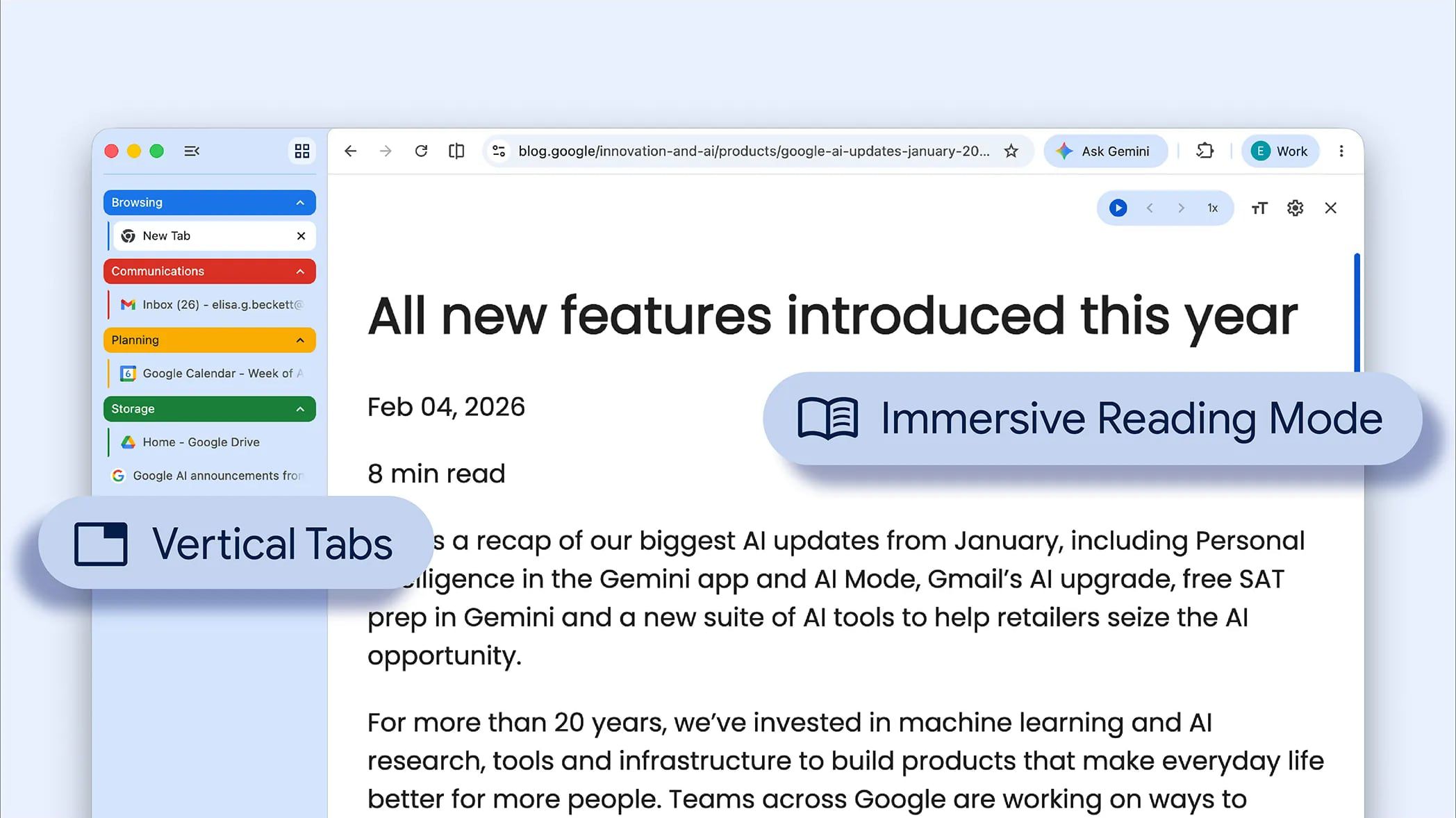
Google has released a major update to its Chrome browser, introducing a long-requested vertical tabs interface and a significantly enhanced reading mode. This move directly challenges the feature advantages of rival browsers like Microsoft Edge and Apple's Safari, marking a strategic shift for Chrome as it seeks to retain its dominant market share in an increasingly competitive landscape.
What Happened
On Tuesday, April 7, 2026, Google released a foundational update to its Chrome browser, deploying two of the most user-requested features in its history. The update fundamentally alters the browser's interface by adding a vertical tabs sidebar and delivers a substantial overhaul to its existing reading mode, transforming how users manage tab overload and consume long-form content.
Key Facts
- Google announced the update for its Chrome browser on Tuesday, April 7, 2026.
- The headline feature is native support for vertical tabs, which are displayed in a persistent sidebar rather than the traditional horizontal bar at the top of the window.
- The update includes a major revision to Chrome's Reading Mode, with improvements focused on enhanced customization and distraction-free immersion.
- The vertical tabs implementation allows users to collapse the sidebar to a minimal icon state, preserving screen real estate for web content.
- This feature set has been a competitive differentiator for browsers like Microsoft Edge and Vivaldi for several years.
- The rollout is global and is being delivered via Chrome's standard automatic update mechanism.
- The development follows a prolonged period of user feedback and experimentation within Chrome's Canary and Beta channels.
Breaking It Down
Google's decision to integrate vertical tabs natively into Chrome is a significant concession to a user base that has long sought better tab management solutions. For over a decade, Chrome's market dominance was built on speed and simplicity, often at the expense of built-in power-user features. This forced a massive ecosystem of third-party extensions to fill the gap, with extensions like The Great Suspender and various tab sidebar add-ons becoming essential for heavy users. By baking this functionality directly into the core browser, Google is acknowledging that the extension model has limits in providing a seamless, performant, and secure experience for fundamental workflow needs.
The introduction of vertical tabs represents the most substantial UI shift for Chrome since its Material Design overhaul nearly a decade ago.
This isn't merely an added option; it's a re-architecture of the browser's primary navigation paradigm. The sidebar design directly addresses the critical pain point of horizontal tab overcrowding, where titles become unreadable icons after a few dozen tabs are opened. The vertical list provides persistent, scannable context for all open pages. More strategically, it brings Chrome to parity with Microsoft Edge, which has leveraged its vertical tabs feature as a key selling point to attract power users from Chrome, especially on Windows. It also narrows the gap with niche browsers like Vivaldi, which have built entire identities around advanced, built-in tab management.
The simultaneous upgrade to Reading Mode is a complementary offensive in the battle for user attention and productivity. While Safari and Edge have offered refined reader views for years, Chrome's implementation has historically been basic. The enhanced mode suggests deeper integration with the browser's rendering engine, likely offering better font choices, color theme controls, text spacing adjustments, and audio read-aloud capabilities. This dual-pronged update—managing tab chaos and improving content focus—signals that Google views the modern browser not just as a gateway to the web, but as a holistic digital workspace where user comfort and control are becoming primary metrics of success.
What Comes Next
The immediate aftermath of this update will focus on user adoption, refinement, and competitive response. Google will be closely monitoring engagement metrics for the new features, which will dictate their future development priority.
- Watch for a rapid iteration cycle in Chrome 127 and 128. Google will likely release follow-up patches within the next 4-8 weeks addressing early user feedback on the vertical tab sidebar, such as options for different widths, icon-only modes, and integration with Chrome's tab groups feature.
- Anticipate a response from Microsoft and Apple. Microsoft is expected to further innovate on Edge's vertical tabs, potentially integrating AI-powered tab grouping or auto-suspension features. Apple may highlight Safari's superior energy efficiency and seamless ecosystem integration as a counterpoint to Chrome's new feature bloat.
- Observe the impact on the Chrome Web Store. Popular tab management extensions will see a sharp decline in active users. Developers of extensions like "Sidewise" or "Tree Style Tab" emulators will need to pivot to more niche enhancements or risk obsolescence.
- Evaluate enterprise adoption. Google will promote these features in its Chrome Enterprise release notes. IT administrators will assess the vertical sidebar for potential use in managed kiosks or vertical workflows where horizontal space is at a premium, influencing Chrome's penetration in corporate environments.
The Bigger Picture
This update is a clear signal in the trend of browser feature convergence. The era of browsers competing solely on JavaScript engine speed is over. The new battlegrounds are user interface innovation, productivity tools, and privacy controls—areas where Chrome has recently been seen as a follower. By adopting a feature pioneered by competitors, Google is working to remove any incentive for users to switch away from Chrome, effectively using its massive scale to absorb good ideas and nullify rivals' advantages.
Furthermore, it reflects the industry's focus on managing digital overload. Both vertical tabs and advanced reading modes are tools for combating cognitive fatigue. The vertical tab sidebar is a direct response to the modern behavior of "tab hoarding," while reading mode is an antidote to cluttered, ad-filled websites. Google is positioning Chrome not just as a tool for accessing information, but for curating and controlling it, aligning with broader tech trends aimed at improving digital well-being and focused work.
Key Takeaways
- Strategic Parity: Google has closed a major feature gap with competitors like Microsoft Edge by natively integrating vertical tabs, reducing a key incentive for power users to switch browsers.
- UI Evolution: The sidebar represents the most significant change to Chrome's user interface in nearly a decade, shifting from a purely horizontal navigation model to a hybrid, space-optimized layout.
- Extension Disruption: Core browser features that were once the domain of third-party extensions are being internalized, threatening the relevance of a segment of the Chrome Web Store ecosystem.
- Workspace Focus: The dual release highlights Chrome's evolution from a simple web viewer into a managed digital workspace, prioritizing user control over tab management and content consumption.